Washing Machine Not Filling With Water? How to Fix It
Washing machine not filling with water? Start with the supply tap, inlet hoses and inlet filters. A closed tap, kinked hose, or blocked filter can restrict water flow. Some washers also spend a few minutes to monitor and sensing the load before filling.
This guide covers Bosch, Samsung, LG and Whirlpool, with shared checks followed by brand-specific steps. It also explains how to distinguish a filling fault from the normal low water level on your model.
Washing Machine Not Filling With Water: Quick Checks Before Repairs
Start by identifying what the washer is doing. No water entering, a slow trickle and water entering then disappearing need different checks. A low water level can also be normal on a high-efficiency machine.
Unplug the washer and turn off its water supply before disconnecting a hose or cleaning an inlet filter. Keep a bucket and towels nearby. Leave the appliance casing closed during these checks.
| What you notice | What to check first |
|---|---|
| No lights or response from the controls | Check the power supply before investigating water intake. |
| The cycle has not started | Check Start/Pause, Delay Start and any door or lid warning. |
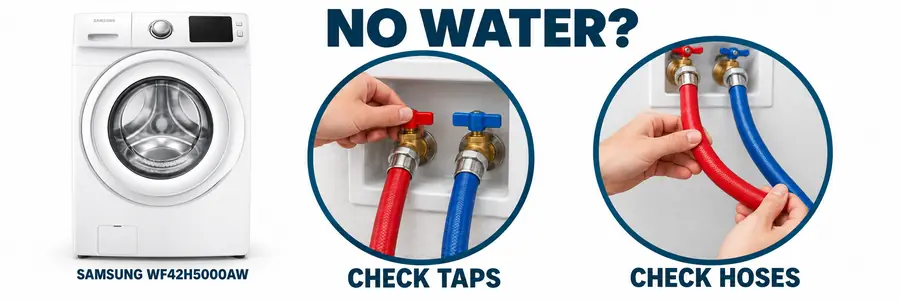
| No water going into the washing machine | Check that the required supply taps are open and water is available. |
| Water enters slowly | Look for a partly closed tap, crushed inlet hose or blocked inlet screen. |
| A new washer will not fill | Recheck the inlet connections and drain-hose installation against its manual. |
| Water enters but drains away | Check the drain arrangement for siphoning. |
| The drum moves briefly before filling | Allow the model’s normal load-sensing stage to finish. |
Some washers use one cold-water connection; others require both hot and cold feeds. Follow the inlet labels and installation instructions for your machine. Selecting a cold wash does not remove a second connection requirement on models designed to use both supplies. Samsung UK
If the controls remain blank, use our washing machine won’t turn on guide first.
Check the cold-water supply at the washer’s tap
When water is not coming into the washing machine, check the supply itself before buying a replacement valve. A nearby working tap does not prove that the washer’s isolation valve is passing water.
If the cold-water connection is accessible and you can disconnect it safely:
- Unplug the appliance and close its water-supply taps.
- Place a towel and bucket beneath the cold-water connection.
- Disconnect the cold inlet hose from the tap, catching residual water.
- Position the bucket under the tap and open it briefly to observe the flow.
- Close the tap, reconnect the hose correctly and check for leaks when reopening the supply.
Weak flow here points towards a supply or plumbing problem. Good flow moves the next checks to the hose and inlet filter. Use your model’s specified pressure or flow requirements; a bucket test measures delivery, not an exact pressure reading. Bosch UK
Bosch Washing Machine Not Filling With Water: Tap and AquaStop Checks
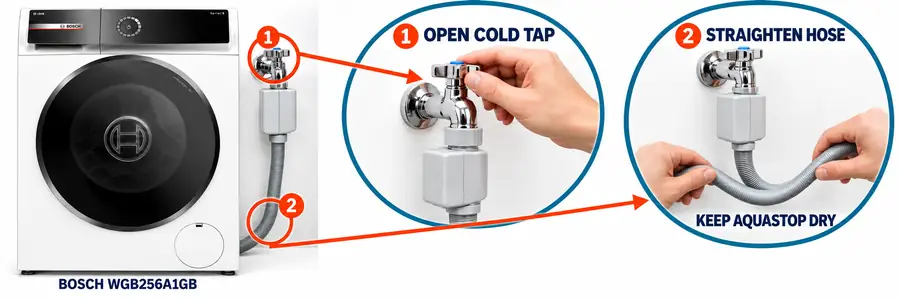
A Bosch washing machine not filling with water may display a tap warning. Bosch associates this warning with low supply pressure or a blocked or kinked fill hose. It does not identify one failed component by itself.
Check the tap warning and cold fill hose
Open the required supply tap and inspect the hose along its route. Pay particular attention to bends behind the cabinet, where pushing the washer back can pinch the hose.
If the Bosch washing machine is not taking water despite an open tap, check delivery at that tap using the bucket procedure above. A partly closed or obstructed isolation valve can restrict flow even when other taps work normally.
Bosch’s tap-symbol guidance explains the supply checks associated with this warning. Bosch UK
Clean the inlet filter for your hose design
Bosch distinguishes between appliances fitted with an AquaStop hose and those using a standard inlet hose. Its cleaning guidance covers brushing filters at the water connection and, on appliances without AquaStop, accessing the filter at the washer end.
Before starting, isolate the power and water, then follow the filter-cleaning procedure for your hose. Brush accessible sediment away gently. Remove a filter only where the instructions show it as removable, and refit it before reconnecting the hose.
Do not immerse the AquaStop safety housing in water: Bosch warns that it contains an electrical valve. Keep that housing intact.
See Bosch’s water-supply and AquaStop filter instructions. You can find the matching manual through Bosch’s E-Nr model-number lookup. Bosch
If supply delivery is adequate, the hose is clear and the warning returns after cleaning, arrange diagnosis rather than opening the AquaStop unit or replacing parts by guesswork.
Samsung Washing Machine Not Filling With Water: Supply Errors and Sensing
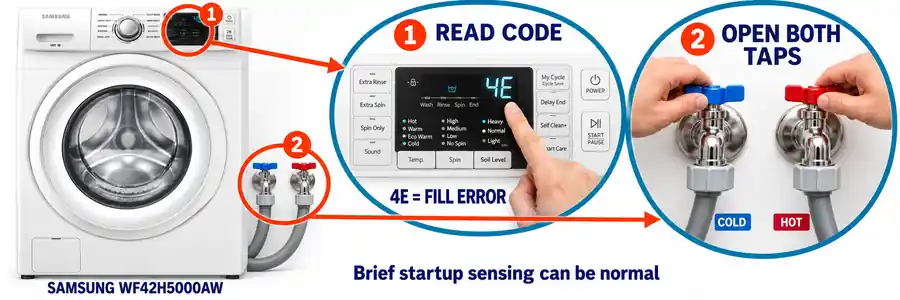
A Samsung washing machine not filling with water may show 4C, 4E or nF, depending on the model. These are water-fill warnings. Record the complete code because similar-looking codes can describe different problems.
Match the inlet connections to your Samsung model
For a Samsung washer not filling with water, check the physical inlet labels before assuming it needs two hoses. UK and US installation requirements can differ: Samsung’s UK guidance identifies cold-only connections on most models it covers, while its US guidance describes machines requiring hot and cold supplies.
On a model requiring both feeds, connect hot to hot and cold to cold, with both supply valves open. Some US machines use the hot supply even during a cycle labelled Cold. Swapped feeds can produce a hot/cold warning such as 4C2 or 4E2, rather than the ordinary no-fill code.
Use Samsung’s error-code guide to match the display to the correct problem. Samsung UK
Check removable mesh filters
If water delivery is good but the Samsung washer will not fill, inspect the inlet mesh filters for rust, sand or other debris.
Samsung describes cleaning removable filters after shutting off the supply and disconnecting the inlet hose. Where your model’s instructions show a removable filter, gently take it out, rinse it and push it fully back into position. Retain the hose’s sealing washer and reconnect the fitting without cross-threading it.
Reopen the water supply slowly and inspect the joint for leaks before restoring power. Samsung’s UK inlet-filter cleaning guide shows this procedure. Samsung UK
Allow normal sensing time before restarting
Samsung explains that some washers rotate the load for approximately two to five minutes before filling to assess its weight. Brief movement with no immediate water can therefore be part of starting the cycle.
If a Samsung EcoBubble, front-load or top-load washer remains dry beyond its normal starting sequence, or a supply error appears, continue with the water checks. Use the full model number when choosing instructions.
After correcting a supply problem, Samsung’s US guidance recommends a one-minute power interruption before retrying. Its water-fill troubleshooting page also explains sensing delays and normal water usage. samsung.com
LG Washing Machine Not Filling With Water: IE Warnings and Slow Filling
An LG washing machine not filling with water may display IE when the required water level is not reached within the allowed time. A slow supply can cause this warning even when some water enters the tub.
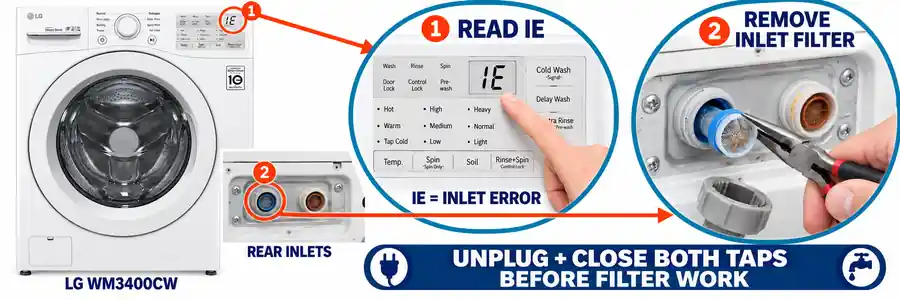
Follow the water path when IE appears
For an LG front-load washer not filling with water, check the supply tap, inlet hose and inlet filters. A partly open tap or a hose crushed behind the appliance can reduce delivery enough to interrupt the cycle.
LG also identifies frozen supply lines as a possible cause in cold weather. If an exposed pipe or hose may be frozen, keep the appliance off and follow LG’s thawing instructions or get plumbing help.
The warning’s meaning is explained in LG’s front-load IE troubleshooting guide. LG USA Support
Clear sediment from supported removable filters
LG’s inlet-cleaning guidance describes removable filters on the machines it covers. With the appliance unplugged and taps closed, disconnect the inlet hose, remove the filter as instructed and clean away the deposits. Reinstall the filter before reconnecting the hose.
An LG washer with slow water fill may have sediment restricting only one inlet. On a model with two feeds, inspect both required connections instead of checking just the cold side.
For an LG ThinQ or Direct Drive washing machine not filling with water, use its full model number to confirm the filter arrangement. LG’s slow-fill and no-fill guide covers restricted hoses, inlet filters and supply problems.
Check the drain setup on an LG top-loader
An LG top-load washing machine not filling with water can also lose incoming water through an incorrectly installed drain hose. This siphoning prevents the tub reaching its intended level.
Check insertion depth and standpipe height against the installation instructions for that model. LG’s top-load IE guide includes drainage installation among its checks. Arrange service if the warning returns after the supply and installation problems are corrected. LG USA Support
Whirlpool Washing Machine Not Filling With Water: Low Flow and Load Sensing
A Whirlpool washing machine not filling with water may show F8 E1, LF or Lo FL, depending on the model. These alerts relate to insufficient incoming water or taking too long to fill. Whirlpool
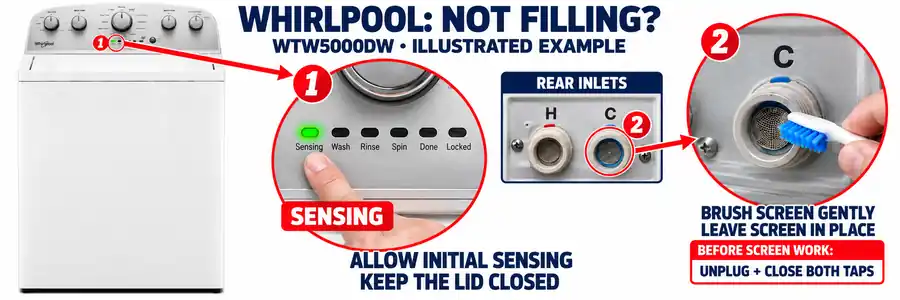
Check both feeds on models requiring hot and cold water
For a Whirlpool washer that will not fill with water, start with the required supply valves and hose connections. Whirlpool’s US guidance describes machines that need both hot and cold feeds connected and open, including during cold-wash operation.
Inspect the hoses for sharp bends, trapped sections and damage. Use the manual for your model and market to confirm its connection requirements.
Leave Whirlpool inlet screens in place
Whirlpool’s cleaning method differs from the removable-filter procedures described above. It instructs owners to clean the inlet screens without removing them or disturbing their position.
- Unplug the washer and shut off its water-supply taps.
- Disconnect the inlet hoses and catch the remaining water in a bucket.
- Inspect the screens at the inlet connections.
- Gently clean visible deposits with a soft brush, mild soap and water, keeping the screens seated.
- Reconnect the hoses, open the supply and inspect the fittings for leaks before restoring power.
Follow Whirlpool’s fill-hose and inlet-screen guidance.
Give auto-sensing models time to start
Some Whirlpool top-load HE washers test the lid lock and move the basket briefly before adding water. Whirlpool describes sensing spins lasting approximately two to three minutes on the machines covered by its guidance. Water can then enter in stages as the load absorbs it.
A Whirlpool auto-sensing washer not filling immediately may still be completing that sequence. Keep the lid closed and follow the starting instructions. Repeatedly restarting can make the observation harder to interpret.
For a Whirlpool Cabrio or Duet washer not filling with water, choose instructions by its full model number. The top-load auto-sensing explanation applies to the designs described there. Whirlpool
On models covered by Whirlpool’s F8 E1 and Lo FL guidance, a fill error can be followed by an eight-to-ten-minute drain routine with temporarily unresponsive controls. Let the routine finish and follow the model’s recovery instructions. If the door remains locked, see our brand-specific washer unlocking guide. Whirlpool
Test the Washer After Correcting the Water Supply
Refit every inlet filter and sealing washer, reconnect the hoses and reopen the required taps. Inspect the joints with the power still off. If a connection leaks, close the supply and correct the fitting before running a cycle.
Restore power and select a short wash or rinse cycle allowed by the manual. Stay nearby to observe whether water enters, remains in the tub and progresses through the cycle.
| Result | What to do next |
|---|---|
| Water enters and the cycle proceeds | Recheck the hose joints for leaks during the test. |
| Water enters but continuously drains away | Recheck drain-hose installation against the model’s manual. |
| The tub fills, then washing stops | Follow the separate mid-cycle troubleshooting guide. |
| Good supply and clear filters, but the same fill error returns | Book diagnosis of the inlet valve, level-sensing system or controls. |
If the machine fills with water then stops, continue with washing machine stops mid-cycle. For water escaping at a hose or cabinet, use our washing machine leaking guide.
A humming sound alone does not establish which part has failed. Supply restrictions and internal faults need to be distinguished before ordering a water inlet valve. Internal electrical testing and valve replacement are beyond these external checks.
Washing Machine Not Filling With Water: FAQs
Why is my washing machine humming but not filling with water?
Check the supply taps, hoses and inlet filters. Note any error code and whether the sound occurs during sensing, attempted filling or draining. A hum cannot confirm a faulty inlet valve on its own; arrange diagnosis if the external checks do not restore filling.
Why is my washer not filling with cold water?
On a machine with separate hot and cold feeds, inspect the cold supply tap, hose and inlet screen. Follow the inlet labels if the hoses were recently disconnected. A normal hot-water supply does not confirm that water is reaching the cold inlet.
Why will my washer not fill on the rinse cycle?
Check which supply the model uses during rinsing, then inspect that tap, hose and screen. A restricted cold feed is worth checking on machines that use it for rinses. Follow any displayed fault code if the problem continues after those checks.
What if water drains out while the washing machine is filling?
Check for siphoning caused by incorrect drain-hose height, excessive insertion or an airtight standpipe connection. Use your own installation manual for the measurements. If water stays in the tub but cannot drain when required, follow our washing machine not draining guide.
Does a low water level mean the washer is faulty?
Not necessarily. High-efficiency washers can use less visible water and add it in stages. Check the selected cycle, load size and model’s operating instructions. A tub that receives no water, a repeated fill warning or laundry that stays dry calls for further checks. samsung.com
Why is a brand-new washing machine not filling with water?
Recheck the open supply taps, required inlet connections, hose routing and drain installation. Allow any normal sensing stage to finish. If installation matches the manual and a fill fault remains, contact the installer or manufacturer before attempting internal repairs.
Should I pour water into the drum to make it start?
Follow the manufacturer’s filling procedure. Adding water manually does not resolve a closed tap, restricted hose or failed inlet system, and it makes a controlled troubleshooting test harder. Correct the supply problem and let the washer manage filling through its normal cycle.